b131f3d078
Added support for encrypted private keys |
||
|---|---|---|
| .github/workflows | ||
| resource | ||
| Dockerfile | ||
| README.md | ||
| action.yml | ||
| entrypoint.sh | ||
README.md
SFTP Deploy Action
Use this action to deploy your files to a server using
SSH Private Key
使用此
action部署你的项目到服务器上,中文介绍链接:使用Github Action 部署项目到云服务器
🚀 1. Inputs
| Name | Required | Default | Description |
|---|---|---|---|
username |
yes | SSH username | |
server |
yes | Remote host | |
port |
yes | 22 | Remote host port |
ssh_private_key |
no | You can copy the private key from your ssh_private_key file and save it to repo/settings/secrets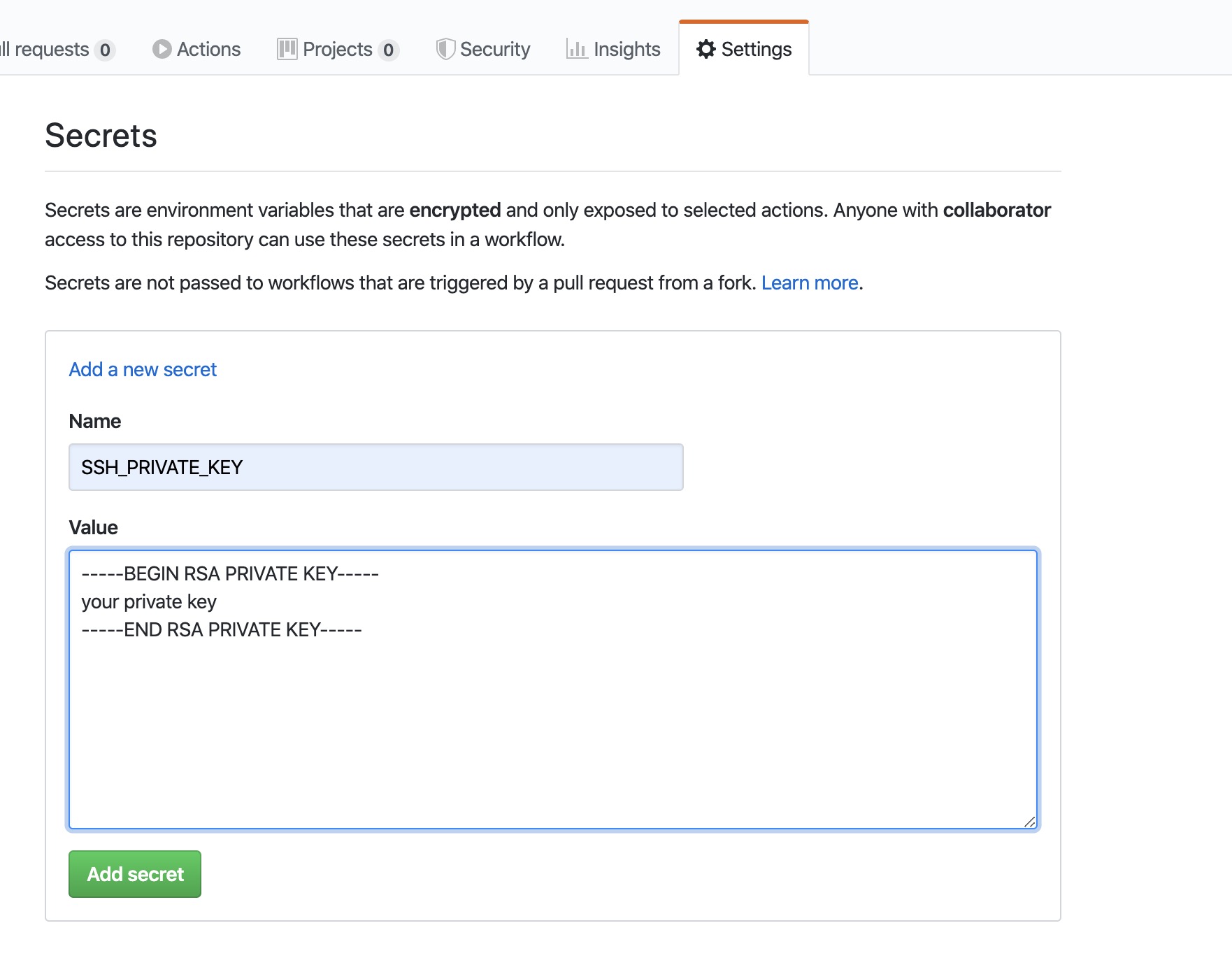 |
|
local_path |
yes | ./* |
Local path of your project. - Single file: ./myfile - Directory: ./static/* Default: ./* (will put all files in your repo). |
remote_path |
yes | The target folder on the remote server. | |
sftp_only |
no | If your port only accepts the sftp protocol, set this option to true. However, when set to true, the remote folder won't be automatically created. |
|
sftpArgs |
no | Extra arguments you want to pass to sftp, for example: -o ConnectTimeout=5 |
|
delete_remote_files |
no | false | Set to true to delete the remote path folder and all files in it before uploading. |
password |
no | SSH password. If a password is set, ssh_private_key and ssh_passphrase is ignored. (for @v1.2.4 and greater) |
|
rsyncArgs |
no | Additional arguments for the rsync command. You can customize file synchronization behavior, such as excluding files or directories. Example: --exclude=node_modules --exclude=.git --exclude=*.log. (for @v1.2.5 and greater) |
|
ssh_passphrase |
no | The passphrase for encrypted ssh private-key |
⚠️ Warning:
Be careful when usingdelete_remote_files. This will permanently delete the remote path folder and all files in it before uploading.
📦 2. Action Examples
🔹 Basic Example
on: [push]

jobs:
  deploy_job:
    runs-on: ubuntu-latest
    name: Deploy Files
    steps:
      - name: Checkout
        uses: actions/checkout@v2

      - name: Deploy to Server
        uses: wlixcc/SFTP-Deploy-Action@v1.2.6
        with:
          username: 'root'
          server: 'your server ip'
          ssh_private_key: ${{ secrets.SSH_PRIVATE_KEY }}
          local_path: './static/*'
          remote_path: '/var/www/app'
          sftpArgs: '-o ConnectTimeout=5'
🔹 Example with rsyncArgs
on: [push]

jobs:
  deploy_job:
    runs-on: ubuntu-latest
    name: Deploy with rsync exclude
    steps:
      - name: Checkout
        uses: actions/checkout@v2

      - name: Deploy with Exclude Patterns
        uses: wlixcc/SFTP-Deploy-Action@v1.2.6
        with:
          username: 'root'
          server: 'your server ip'
          ssh_private_key: ${{ secrets.SSH_PRIVATE_KEY }}
          local_path: './'
          remote_path: '/var/www/app'
          rsyncArgs: '--exclude=node_modules --exclude=.git --exclude=*.log'
          sftpArgs: '-o ConnectTimeout=5'
🔹 Example with Password Authentication
on: [push]

jobs:
  deploy_job:
    runs-on: ubuntu-latest
    name: Deploy with Password
    steps:
      - name: Checkout
        uses: actions/checkout@v2

      - name: Deploy with Password
        uses: wlixcc/SFTP-Deploy-Action@v1.2.6
        with:
          username: ${{ secrets.FTP_USERNAME }}
          server: ${{ secrets.FTP_SERVER }}
          port: ${{ secrets.FTP_PORT }}
          local_path: './static/*'
          remote_path: '/var/www/app'
          sftp_only: true
          password: ${{ secrets.FTP_PASSWORD }}
🔹 Example with Encrypted Private Key Authentication
on: [push]

jobs:
  deploy_job:
    runs-on: ubuntu-latest
    name: Deploy with encrypted private key
    steps:
      - name: Checkout
        uses: actions/checkout@v2

      - name: Deploy with encrypted private key
        uses: wlixcc/SFTP-Deploy-Action@v1.2.6
        with:
          username: ${{ secrets.FTP_USERNAME }}
          server: ${{ secrets.FTP_SERVER }}
          port: ${{ secrets.FTP_PORT }}
          local_path: './static/*'
          remote_path: '/var/www/app'
          sftp_only: true
          ssh_private_key:  ${{ secrets.SSH_PRIVATE_KEY }}
          ssh_passphrase: ${{ secrets.SSH_PASSPHRASE }}
🌐 3. Deploy React App Example
on: [push]

jobs:
  deploy_job:
    runs-on: ubuntu-latest
    name: Build & Deploy React App
    steps:
      - name: Checkout
        uses: actions/checkout@v2

      - name: Install Dependencies
        run: yarn

      - name: Build
        run: yarn build

      - name: Deploy Build Folder
        uses: wlixcc/SFTP-Deploy-Action@v1.2.6
        with:
          username: 'root'
          server: '${{ secrets.SERVER_IP }}'
          ssh_private_key: ${{ secrets.SSH_PRIVATE_KEY }}
          local_path: './build/*'
          remote_path: '/var/www/react-app'
          rsyncArgs: '--exclude=*.map'
          sftpArgs: '-o ConnectTimeout=5'
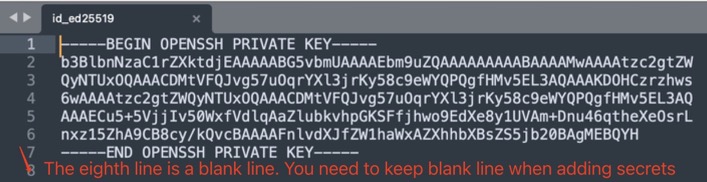
🛡️ 4. Invalid format? You need to keep the format
If you use the Ed25519 algorithm to generate an SSH key pair:
ssh-keygen -t ed25519 -C "your_email@example.com"
⚠️ Important:
The last line of the private key must remain a blank line when adding it to Repository Secrets.
If you remove it, you might encounter an invalid format error.