11 KiB
Model Training
This page introduces how to train MiniMind-V vision-language models from scratch.
📊 Data Preparation
1. Download Dataset
Download datasets from the following addresses:
Create ./dataset directory and place data files:
./dataset/
├── pretrain_vlm_data.jsonl        # Pretrain data (~595K samples)
├── sft_vlm_data.jsonl             # Single-image SFT data (~300K samples)
├── sft_vlm_data_multi.jsonl       # Multi-image SFT data (~13.6K samples)
├── eval_images/                   # Test images
│   ├── 城市车水马龙-city-traffic.jpg
│   ├── 熊猫草地-Panda-Grassland.jpg
│   └── ...
└── sft_multi_images_trans_image.zip  # Multi-image data images (needs extraction)
!!! tip "Dataset Notes"
- *.jsonl are Q&A datasets
- *images are accompanying image data, need to be extracted after download
- Please reserve about 5GB space for the dataset
- If space is insufficient, try skipping pretrain and go directly to SFT training
2. Data Format
Pretrain Data Format (pretrain_vlm_data.jsonl):
{
  "conversations": [
    {
      "role": "user",
      "content": "Provide a brief description of the given image.\n<image>"
    },
    {
      "role": "assistant",
      "content": "Olive oil is a healthy ingredient for free use."
    }
  ],
  "image": "GCC_train_002582585.jpg"
}
Single-Image SFT Data Format (sft_vlm_data.jsonl):
{
  "conversations": [
    {
      "role": "user",
      "content": "What impact does the location of the alarm clock have on sleep quality?<image>"
    },
    {
      "role": "assistant",
      "content": "Place the digital alarm clock on the nightstand..."
    }
  ],
  "image": "train-00000-of-00001_image_0_0.jpg"
}
Multi-Image SFT Data Format (sft_vlm_data_multi.jsonl):
{
  "conversations": [
    {
      "role": "user",
      "content": "context: Source Image: <image> Target Image: <image> Instruction: What is the correct image edit instruction?<image>"
    },
    {
      "role": "assistant",
      "content": "take the people out of the back in the photo..."
    }
  ],
  "image": "0.jpg, 1.jpg"
}
3. Data Source
-
Pretrain Data: Chinese-LLaVA-Vision
- Approximately 570,000 images from CC-3M and COCO 2014
-
SFT Data: llava-en-zh-300k
- 300K instruction fine-tuning data
- 150K images
- Translated content, better Chinese support
🎯 Training Pipeline
All training scripts are located in the ./trainer directory.
Step 0: Prepare Base Language Model
Download pure language model weights to the ./out directory (as the base language model for training VLM):
# Download 512-dim model
wget https://huggingface.co/jingyaogong/MiniMind2-V-PyTorch/blob/main/llm_512.pth

# Or download 768-dim model
wget https://huggingface.co/jingyaogong/MiniMind2-V-PyTorch/blob/main/llm_768.pth
Step 1: Pretraining (Learning Image Description)
The pretraining stage teaches the model general image knowledge, such as a deer is a deer, a dog is a dog.
cd trainer
python train_pretrain_vlm.py --epochs 4

# Multi-GPU training
torchrun --nproc_per_node 2 train_pretrain_vlm.py --epochs 4
Output weights: ./out/pretrain_vlm_*.pth (* is the model dimension, default is 512)
!!! info "Training Duration" - MiniMind2-Small-V (26M): ~1h (single 3090) - MiniMind2-V (104M): ~3h (single 3090)
Training Strategy:
- Freeze Visual Encoder (CLIP model) gradients
- Only train the last layer parameters of Projection and LLM
Loss Curve:

Step 2: Supervised Fine-Tuning (Learning Image-Caption Dialogue Style)
The SFT stage teaches the model real image-text dialogue format, better aligning with human communication habits.
python train_sft_vlm.py --epochs 4

# Multi-GPU training
torchrun --nproc_per_node 2 train_sft_vlm.py --epochs 4
Output weights: ./out/sft_vlm_*.pth
!!! info "Training Duration" - MiniMind2-Small-V: ~1h (single 3090) - MiniMind2-V: ~3h (single 3090)
Training Strategy:
- Freeze Visual Encoder (CLIP model) gradients
- Set all parameters of Projection and LLM as learnable
Loss Curve:

Step 3 (Optional): Multi-Image Fine-Tuning
Multi-image fine-tuning provides a demo example based on bird comparison dataset.
python train_sft_vlm.py --epochs 4 --use_multi_image
Notes:
- Multi-image dataset is relatively small and contains English conversations
- Only includes two-image comparison scenarios
- Fine-tuning effect is limited, provided as a reference approach
!!! warning "Training Notes"
By default, training process saves parameters every 100 steps to ./out/***.pth (will overwrite old weight files)
📈 Model Architecture Details
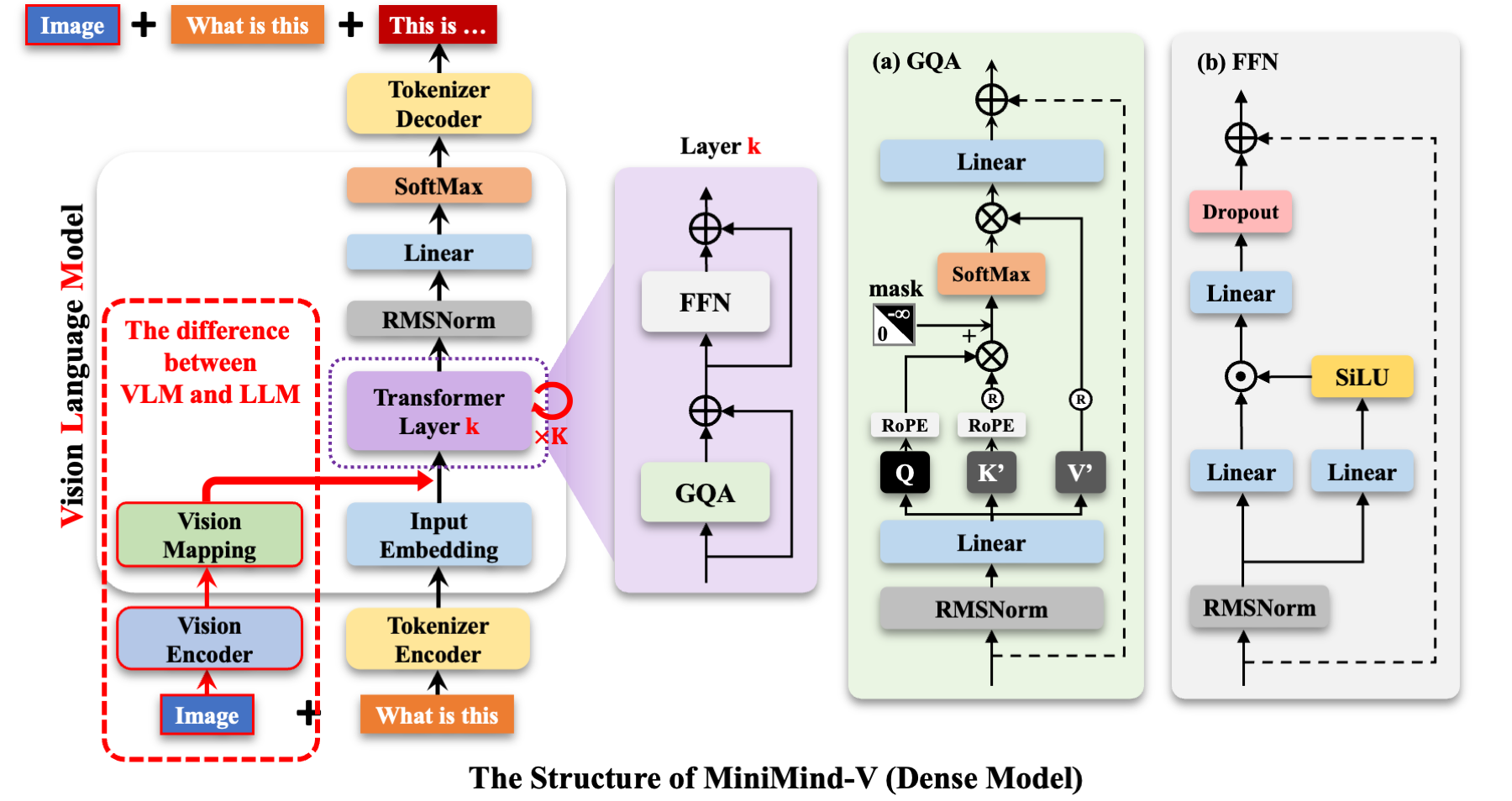
MiniMind-V's structure only adds Visual Encoder and feature projection submodules:
Core Components
-
Visual Encoder
- Uses clip-vit-base-patch16
- Based on ViT-B/16 architecture
- Input image: 224×224
- Patch size: 16×16
- Output: 196×768 dimensional features (196 visual tokens)
-
Projection Layer
- Simple unbiased linear transformation
- Functions:
- Aligns 768-dimensional visual tokens to LLM text tokens
- Maps image features to the same space as text embeddings
- Achieves cross-modal feature alignment
-
Language Model
- Fully inherits from MiniMind
- Minimal modifications (core algorithm changes < 50 lines)
Input-Output Mechanism
Input Format:
In minimind-v, a 196-character @@@...@@@ placeholder is used to replace the image:
@@@......@@@\nWhat is this image describing?
Why 196 characters? Because any image is encoded by the CLIP model as 196×768 dimensional tokens.
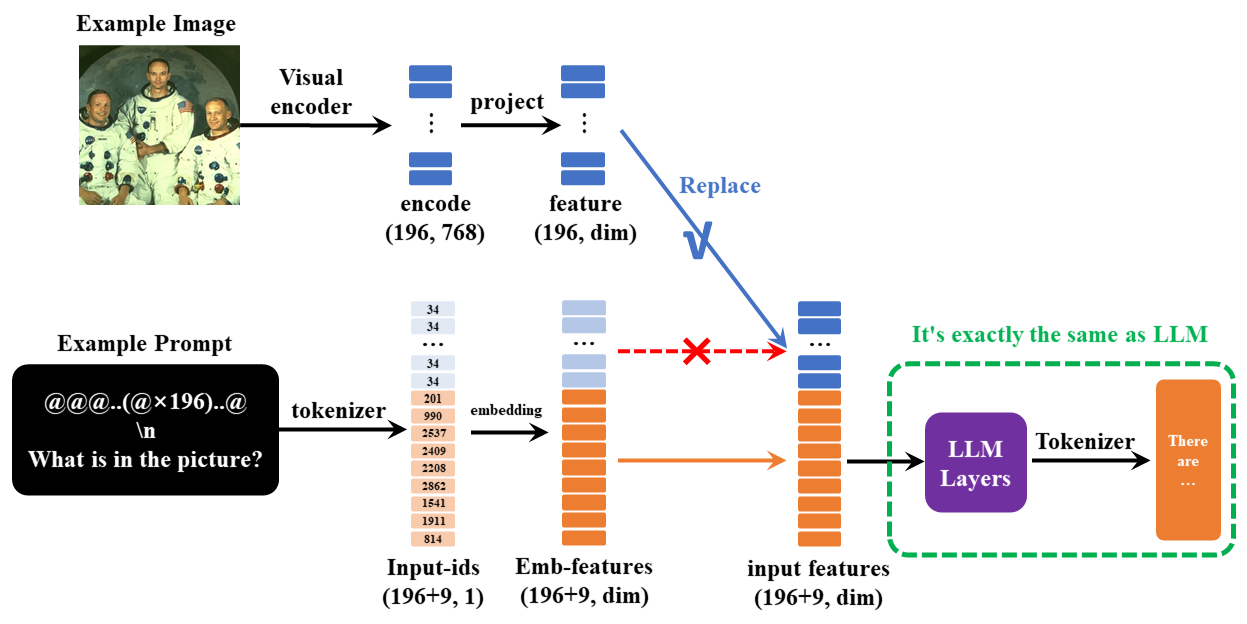
Multi-Image Implementation:
Achieved by injecting multiple <image> placeholders, no framework modification needed.
Model Parameter Configuration
| Model Name | Params | d_model | n_layers | kv_heads | q_heads | Visual Token |
|---|---|---|---|---|---|---|
| MiniMind2-Small-V | 26M | 512 | 8 | 2 | 8 | 196×768 |
| MiniMind2-V | 104M | 768 | 16 | 2 | 8 | 196×768 |
🧪 Test Model
Test Trained Model
Ensure the model *.pth file to be tested is in the ./out/ directory.
# model_mode=0: test pretrain model
python eval_vlm.py --model_mode 0

# model_mode=1: test SFT model
python eval_vlm.py --model_mode 1
Use Pre-Trained Model
You can also directly download and use pre-trained *.pth files:
🔧 Multi-GPU Training
DDP Method
torchrun --nproc_per_node N train_xxx.py
DeepSpeed Method
deepspeed --master_port 29500 --num_gpus=N train_xxx.py
Wandb Monitoring
# Login first
wandb login

# Enable wandb
torchrun --nproc_per_node N train_xxx.py --use_wandb
By adding the --use_wandb parameter, you can log the training process. After training, you can view the process on the wandb website.
You can specify the project name and run name by modifying wandb_project and wandb_run_name parameters.
💰 Training Cost
Based on single NVIDIA 3090:
| Dataset Combination | Training Time | Cost (Approx.) | Effect |
|---|---|---|---|
| pretrain (1 epoch) + sft (1 epoch) | 2h | ≈1.3 RMB | 😊😊😊 Basic dialogue |
| pretrain (4 epochs) + sft (4 epochs) | 8h | ≈5.4 RMB | 😊😊😊😊😊 Better effect |
!!! success "Quick Reproduction" Using single epoch of pretrain and SFT, single 3090 only needs 2 hours + 1.3 RMB to train a vision-language ChatBot!
📝 Training Tips
1. Reduce Memory Usage
- Use smaller batch size
- Use 512-dim model instead of 768
- Enable gradient checkpointing (if implemented)
- Use DeepSpeed ZeRO optimization
2. Accelerate Training
- Use multi-GPU training (DDP or DeepSpeed)
- Use mixed precision training (FP16)
- Reduce image resolution (but may affect performance)
3. Improve Performance
- Increase training epochs
- Use larger model (768 vs 512)
- Use higher quality datasets
- Adjust learning rate
🎓 Core Principles
Why Pretraining?
Pretraining teaches the model basic image description capabilities, establishing fundamental mapping relationships between image features and text.
Why SFT?
SFT teaches the model real dialogue formats, making its outputs more aligned with human communication habits rather than simple image descriptions.
Why Freeze CLIP?
CLIP is already a powerful pre-trained visual encoder. Freezing its parameters can:
- Significantly reduce trainable parameters
- Speed up training
- Prevent overfitting
- Lower training costs
Future Improvement Directions
> More complex Projection layers (e.g., Cross-Attention) may bring better cross-modal alignment
> Use larger CLIP models (e.g., large series) for finer-grained image features
> Increase image resolution (currently only 224×224, dataset uses 128×128)
> Expand multi-image datasets to support more complex multi-image understanding scenarios
📚 Related Resources
❓ Common Issues
1. Out of memory during training?
- Reduce batch_size
- Use 512-dim model
- Use DeepSpeed ZeRO
- Single-GPU training instead of multi-GPU
2. Training loss not decreasing?
- Check if dataset path is correct
- Check if learning rate is appropriate
- Confirm base LLM model is loaded correctly
- Check for gradient explosion/vanishing
3. Multi-GPU training error?
- Ensure all GPUs are visible and CUDA versions are consistent
- Check if port is occupied (modify
--master_port) - Try using DeepSpeed instead of DDP
4. How to use custom dataset?
Prepare jsonl files and corresponding images according to the data format above, and modify the data path in the training script.
🎯 Next Steps
Congratulations! You've learned the complete training process of MiniMind-V. Now you can:
- Start training your own vision-language model
- Try using different datasets
- Explore the source code implementation
- Contribute your improvements to the project